

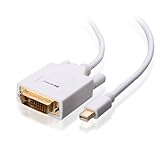
Overview
* Mini DisplayPort was first used by Apple on Oct 14, 2008. It is NOT
for use with earlier Apple Mac (before 2008) that have Mini DVI. Please check
your port before purchase
* Thunderbolt compatible
Instruction
Mac uses external display as an extension. Please drag window on desktop all the way
towards right to cross display edge and the window will be displayed on external
display.
You may set external display to a mirror display
1 With your external display connected to Mac, open System Preference
2 Select Display
3 Select Arrangement tag
4 Check Mirror Display
Specification
* Up to 1920×1200 resolution support
* Input: Mini DisplayPort 1.2
* Output: DVI-D Dul-Link
* Connectors: Gold Plated Mini DisplayPort / Thunderbolt male & DVI male
* HDCP compliant
Compatibility
Apple
* MacBook
* MacBook Pro
* Retina MacBook Pro
* MacBook Air
* iMac
* Mac Mini
* Mac Pro
Lenovo ThinkPad
* X1 Carbon
* X230
* L 430/530
* T 430/430s/430u/530
* W 530
Microsoft Surface for Windows

Free Shipping on orders of $25 or more
Follow Us!